

DRAFT
TM 5-4210-249-13&P-2
0193
PRESSURE GOVERNOR PRESET PSI ADJUSTMENT
NOTE
RPM and PSI are parameters that may be preset and adjusted by the pressure governor
control panel. The preset programming mode is enabled when the PRESET switch is held
for 10 seconds, after power is applied to the governor control panel. RPM presets are not
used.
The RPM and PSI preset parameters are set by Pierce Manufacturing as follows:
- - - - - - - - - - - - - - - - - - - - - - - - - - - - - - - - - - - - - -
Table 3.
Personnel Cab Governor Control
RPM
None
PSI
225
- - - - - - - - - - - - - - - - - - - - - - - - - - - - - - - - - - - - - -
Table 4.
Pump Operator's Panel Governor Control
RPM
None
PSI
125
- - - - - - - - - - - - - - - - - - - - - - - - - - - - - - - - - - - - - -
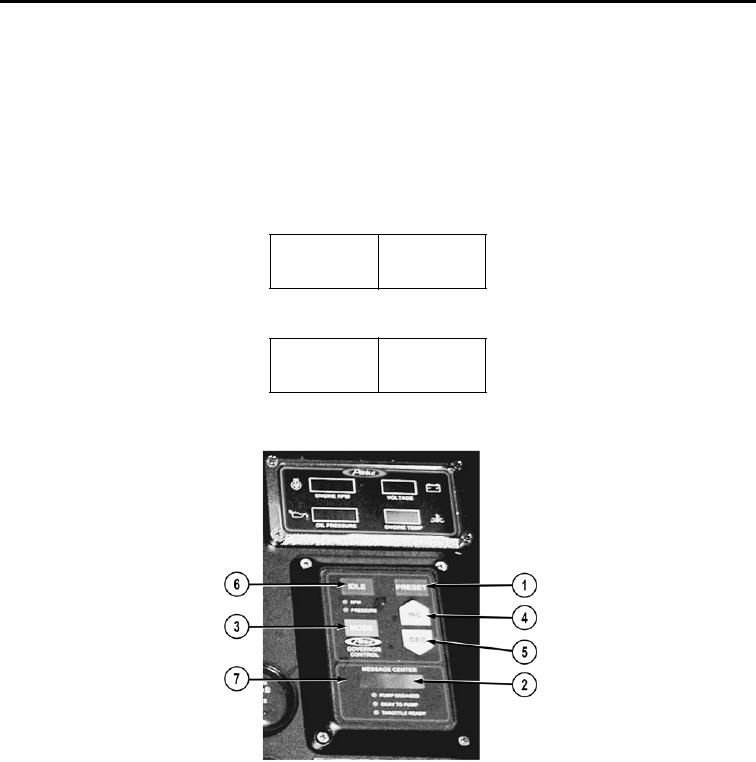
TFFT04426
1.
Press and hold PRESET switch (1) until PRESET is displayed in MESSAGE CENTER (2).
2.
Press MODE switch (3) until PSI PRESET is displayed in MESSAGE CENTER (2).
3.
Adjust the governor control panel PSI PRESET value by using INC switch (4) and DEC switch (5) until desired
PSI is displayed.
4.
Press PRESET switch (1) to store value. MESSAGE CENTER (2) will display STORING.