

DRAFT
TM 5-4210-249-13&P-1
0095
MALFUNCTION
TEST OR INSPECTION
CORRECTIVE ACTION
TFFT04032
CAUTION
Do not mix different types or brands of foam agent in foam tanks or piping. Mixing
of different foam agents (either type or manufacturer) may cause deterioration of
foam agent, improper proportioning and poor performance in a fire situation.
Mixing of Class A and Class B foam agents may result in a chemical reaction which
can create globules, which can clog orifices and cause system failure.
Step 1.
Turn battery disconnect switch to ON position (WP 0007). Open pump operator's
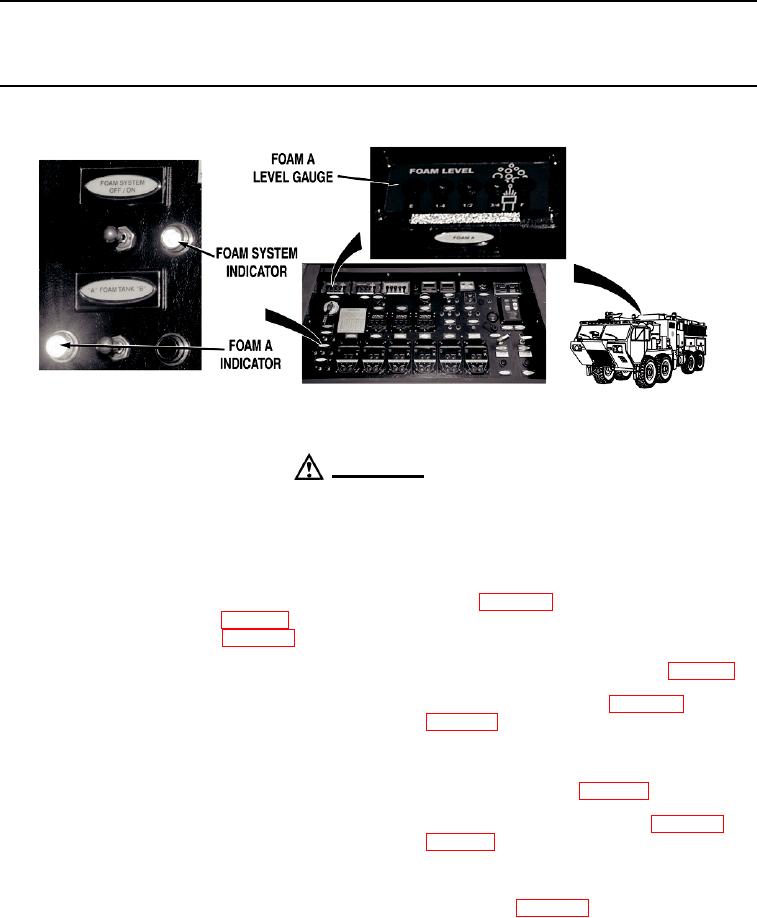
panel (WP 0019). Check level indicated at pump operator's panel FOAM A LEVEL
gauge (WP 0004).
If FOAM A LEVEL gauge indicated E (empty), fill foam A tank (WP 0031).
Step 2.
Put pump operator's panel FOAM SYSTEM switch to ON position (WP 0004). Check if
FOAM SYSTEM indicator illuminates (WP 0004).
If FOAM SYSTEM indicator does not illuminate, troubleshoot Foam Not
Delivered From All Systems (Bumper Turret, Ground Sweeps, and Manual
Metering Controls) or System Does Not Shut Off (WP 0094).
Step 3.
Put and hold pump operator's panel FOAM TANK switch to "A" position (WP 0004).
Check if foam A indicator illuminates (WP 0004).
If foam A indicator does not illuminate, go to Step 24.
Step 4.
Release pump operator's panel FOAM TANK switch (WP 0004). Check if foam A
indicator remains illuminated.
If foam A indicator remains illuminated, go to Step 13.
0095-2