

DRAFT
TM 5-4210-249-13&P-2
0127
MALFUNCTION
TEST OR INSPECTION
CORRECTIVE ACTION
TFFT04357
WARNING
ICON 3
Remove rings, wristwatches, neck chains, and any other jewelry before working
around vehicle. Jewelry can catch on equipment and cause serious injury. Jewelry
and tools may short across electrical circuits and cause damage to equipment, or
severe burns or electrical shock to personnel.
Step 15.
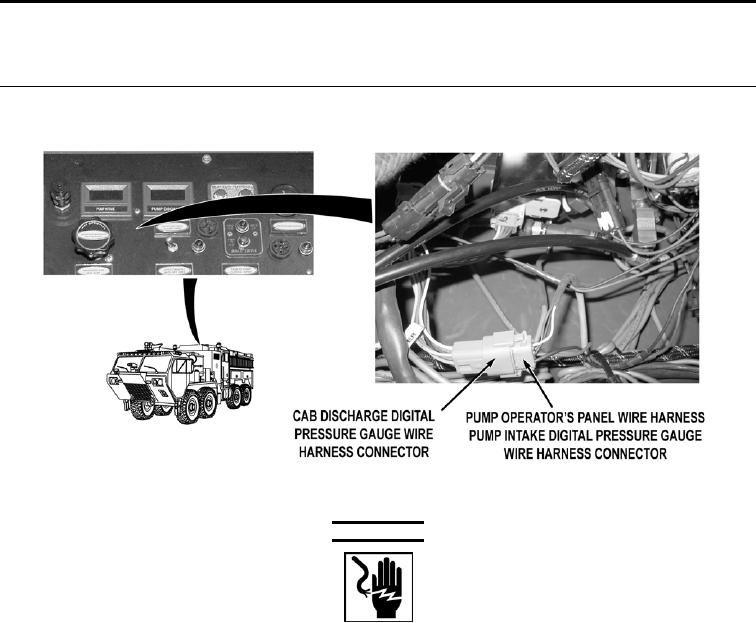
Turn battery disconnect switch to OFF position (WP 0007). Open pump operator's
panel housing (WP 0325). Disconnect pump operator's panel wire harness PUMP
INTAKE digital pressure gauge wire harness connector. Disconnect pump operator's
panel pump discharge pressure transducer wire harness from cab discharge digital
pressure gauge wire harness (WP 0438). Connect pump intake digital pressure gauge
wire harness connector to cab discharge digital pressure gauge wire harness
connector. Turn battery disconnect switch to ON position (WP 0007). Check if
personnel cab and pump operator's panel PUMP DISCHARGE gauge displays an error
message (WP 0004).
If personnel cab and pump operator's panel PUMP DISCHARGE digital
pressure gauge does not display an error message, go to Step 19.
0127-8